When I write code, I usually try to imagine all the conditions under which the code will run, what can fail, etc., and write code or add comments to handle or describe these conditions. I am sure I am not alone in this and that there are a number of formalized procedures that promote this.
I am wondering if this is becoming an "old fashioned" way to program.
The modern way seems to be to bash out code as fast as possible without thinking too much, and fix problems as they arise. I expect this is not entirely new, but rather is simply becoming more common, and perhaps even more accepted. In fact the whole agile thing seems to address how one can code in this fashion but still end up with good code.
I am suddenly suspicious that I am in danger of losing touch, and becoming an "old fogey" in coding terms. Not because I don't keep up with my reading (I do) but because deep down I am still holding on to old ideals and methods.
Still, they say that half of fixing a problem is recognizing you have it :-)
Friday, April 21, 2006
Development Philosophy


Sunday, March 12, 2006
Reflection Over Generic Types - Follow-Up
Saturday, March 11, 2006
Reflection Over Generic Types - Bug?
Inspired by a episode #9 of DNR TV, I ran the following program to see the type info for a generic base class, where the type parameter is passed from the derived class, and was unpleasantly surprised by the result:
Public Class Base(Of T)
End Class
Public Class Derived(Of T)
Inherits Base(Of T)
End Class
Public Class Program
Shared Sub Main()
DisplayInfo(GetType(Base(Of Integer)), 0)
DisplayInfo(GetType(Derived(Of Integer)), 0)
End Sub
Private Shared Sub DisplayInfo(ByVal type As Type, ByVal indent As Integer)
WriteLine(type.Name, indent)
WriteLine(type.FullName, indent)
If type.IsGenericType Then
WriteLine("Yes, it's generic baby!", indent)
If Not type.IsGenericTypeDefinition Then
WriteLine("and here's its generic type def:", indent)
DisplayInfo(type.GetGenericTypeDefinition, indent + 1)
End If
Else
WriteLine("It's not generic, man!", indent)
End If
If type.BaseType IsNot GetType(Object) Then
WriteLine("and here's its base type:", indent)
DisplayInfo(type.BaseType, indent + 1)
End If
End Sub
Private Shared Sub WriteLine(ByVal s As String, ByVal indent As Integer)
Debug.Write(Space(indent * 4))
Debug.WriteLine(s)
End Sub
End Class
Here's the output:
1 Base`1
2 WindowsApplication1.Indent.Base`1[[System.Int32, mscorlib, Version=2.0.0.0, Culture=neutral, PublicKeyToken=b77a5c561934e089]]
3 Yes, it's generic baby!
4 and here's its generic type def:
5 Base`1
6 WindowsApplication1.Indent.Base`1
7 Yes, it's generic baby!
8 Derived`1
9 WindowsApplication1.Indent.Derived`1[[System.Int32, mscorlib, Version=2.0.0.0, Culture=neutral, PublicKeyToken=b77a5c561934e089]]
10 Yes, it's generic baby!
11 and here's its generic type def:
12 Derived`1
13 WindowsApplication1.Indent.Derived`1
14 Yes, it's generic baby!
15 and here's its base type:
16 Base`1
17
18 Yes, it's generic baby!
19 and here's its generic type def:
20 Base`1
21 WindowsApplication1.Indent.Base`1
22 Yes, it's generic baby!
23 and here's its base type:
24 Base`1
25 WindowsApplication1.Indent.Base`1[[System.Int32, mscorlib, Version=2.0.0.0, Culture=neutral, PublicKeyToken=b77a5c561934e089]]
26 Yes, it's generic baby!
27 and here's its generic type def:
28 Base`1
29 WindowsApplication1.Indent.Base`1
30 Yes, it's generic baby!
The problem is with the blank line on line 17. The base of the open generic class definition for Derived has no full name! Presumably line 17 should show the same as line 6. If you change Derived(Of T) to inherit from Base(Of Double) for example, all is fine.
Friday, February 17, 2006
Upgrade Fun - Moving to VS2005
Following on from my first post, we are now starting to upgrade for real and trying to get rid of those warnings. This is being hampered by the background compiler: every time I fix up a bit of code off it goes, hogging my CPU, until it has gone through the entire solution I guess. A search on the MSDN forums turns up this from MS guy Matthew Gertz:
"The background compiler cannot be turned off in Visual Basic .Net – it’s actually the thing that’s providing all of the Intellisense information, formatting information, and so on. I discuss this in some detail here. In that article are some tips to improve performance in larger-scale applications."
To minimize this problem, I am opening our projects one by one (bottom-up in the reference tree) instead of all at once in our monster solution. In fact, I think our development is going to have to continue this way until the background compiler's performance (or at least its perceived performance) is greatly improved.
Using an instance variable to access a shared member (Error ID: BC42025)
I would like to turn this warning off rather than fix it, because using a short
variable name in place of a sometimes quite long class name can reduce clutter and
make the code easier to read. However one of the ways we do this is we declare an
instance of an enum type (nested in another class) to provide short-cut access to
the enum literals, which results in an "unused variable" warning which I definitely
don't want to turn off.
Fortunately, initializing the enum variable removed the "unused" warning, at least in this compiler version. This is fortunate because the warning was also occurring when accessing members of the DialogResult enumeration on a form: Form also has a DialogResult property which hides the enum so you end up having to fully qualify it (or partially qualify it if you import a parent namespace, e.g. System.Windows).
Getting out of bad VB6 habits, and other details
The new compiler is much more fussy (a Good Thing) at pointing out poor form, including:
- Not explictly initializing reference variables if they are going to be used before an assignment;
- Not explictly returning Nothing from a function (a variant of this is having return statements inside a Select - you're then forced to define an "else" clause, which is another Good Thing);
- Leaving unused variable declarations lying around.
Mind you, the explicit initializer thing is a bit of a pain when you're only going to initialize it to Nothing anyway. I've gotten too used to seeing lack of an initializer as an invisible Nothing or 0 (note the compiler doesn't fuss about default initialization of value types - why the inconsistency?) Also, the parser doesn't recognize patterns such as this, and reports that ref is used before being initialized:
   Dim isFirstTime As Boolean = True
   Dim ref As SomeClass
   For i As Integer = 0 To 10
      If isFirstTime Then
         ref = SomeMethod()
         isFirstTime = False
      Else
         'use ref
      End If
   Next
Another annoying variant of this is "Variable 'XXX' is passed by reference before it has been assigned a value. A null reference exception could result at runtime." This is annoying when you are passing by reference because the method is going to initialize the variable. This is a weakness of ByRef in VB: it means "in/out" and we have no keyword to specify just "out".
Proper XML commenting - Hooray!
We had had a half-hearted attempt to add these in using the VBCommenter add-in in Visual Studio 2003, but stopped when we found Intellisense wasn't picking up our descriptions. We've now got to fix syntax errors (invalid whitespace), mismatched param elements etc. in the existing comments.
I am getting a strange error though: "XML documentation parse error: "Whitespace is not allowed at this location. XML comment will be ignored." This is being reported inside the summary element. I.e. I can cut all the lines between <summary> and </summary> and it is fine, but when I paste the original text back (which contains no XML or anything obviously funky), the error springs back.
D'oh - the summary text contained an ampersand! So it seems like it is a real XML document fragment.
Inappropriate use of 'Overloads' keyword in a module
This surprised me. The help link merely says that modules aren't classes and therefore can't use MustInherit etc., blah, blah. Nothing about why Overloads is invalid on Module members. You can use it on Shared class members, so what's the problem? Amanda Silver explains:
We decided to give this warning because the application of the Overloads keyword only makes a difference to the semantics of the application when the method is overloaded across an inheritance chain. As the Overloads is superfluous in the context of a Module (and possibly misleading) we decided to emit a warning. Note, however, that the warning can be turned off by going to the project properties and selecting the "Disable all warnings" check box.
I love the last sentence!
I need to revise the purpose of Overloads and Shadows to fully understand this, but I would have thought that if you get a warning for Module members, you should get one for Shared class members too. Stay tuned.
Name '_blah' is not CLS-compliant
In a number of places, we have protected fields which, because they are fields, begin with an underscore. Because protected members are exposed outside the assembly and therefore available to other assemblies, they should be CLS-compliant (which means they can't begin with an underscore). The easiest way round this, since we don't need to interop with other .NET languages, is to mark the entire assembly as not CLS compliant in Assembly.vb.
Keeping Your Friends Close
In C++ you could (I suppost "can" would be better, but I don't think I'll be using C++ very much in the future) explicitly specify who your friends are, to the class or even method (or top-level function) level, which means you keep control over the interfaces to your class.
From a library writer's perspective (when looking at the library as a whole at least), Friend is somewhat useful because it lets you separate "us" from "them", but when you're writing in-house code and trying to design coherent public and proptected interfaces, Friends can become your enemies.
Especially since we are encouraged to write "big" assemblies to reduce load times and so can't use the assembly as a fine-grained partitioning mechanism for tightly coupled classes.
What would be nice is a namespace-like mechanism to allow you to group classes together into friendships, so that only classes in the same friendship group have access to each other's Friend members.
Namespaces themselves can't be used of course, because anyone can add additional types to a namespace.
But you could say that Friend members where only accessible from type in the same assembly and namespace. Or, better, allow the Friend keyword to be used on a namespace declaration to mean "Friends within this namespace aren't accessible outside it" (obviously the "same assembly" restriction would still hold). The good thing with this approach is that if you don't use it you get the current behaviour.
What do you think Mr. Vick?
Update
Having proudly e-mailed Paul Vick my suggestion, I blushingly realized that what I should have done is enter it via the "Make a Suggestion" link on the MSDN product feedback page. When I started to do that I found several other suggestions along the same lines (i.e. reintroducing C++ style friend specifiers), but none I think as simple as mine, although I have conveniently ignored how these friend namespaces should be managed across multiple source files in the same assembly - i.e. should you be made to specify "friend" for all of them, or should doing it once automatically apply to all; perhaps it is analagous to partial classes. Also I didn't think of the work that would be needed in the CLR; after all, namespaces are just syntactic sugar, right? Yeah, but friend/internal isn't! Sometimes I wish I'd just keep my (e-)mouth shut.
Update #2
Paul Vick replied on 26th Feb:
Hey, Ian, I apologize for taking so long to write back! More granular Friend control is definitely something that's been requested in a number of different ways and it's something we'll definitely look at as we plan our next release. It's definitely a matter of trying to balance the need for control versus the need to keep the concept count down as much as possible, always a delicate trade off.
Thanks for making the suggestion and thanks for using VB!
Paul
Tuesday, February 14, 2006
Synchronize Class View in VS2005
Wanted to give this some more Google-juice (though I don't think even the Google spider reads my blog) because the help docs lie:
http://blogs.msdn.com/ansonh/archive/2005/12/09/502020.aspx
A Quote for New Bloggers
Sadly this is not generally the case, and you either give up in defeat, or relegate your blog to a personal diary. Alternatively you can image that there really are hundreds, nay thousands, of appreciative readers who are just too shy to leave comments.
With a few notable exceptions (see, a good blogger would put some links in here) most of the popular blogs out there are popular because they are written by well-known speakers or authors (and I'm being parochial here, I've no idea what happens in blogs I don't read).
And here's why (and finally the point of this post):
http://www.quotationspage.com/quote/1984.html
P.S. if anyone is reading this blog, please excuse posts mysteriously appearing "in the past"; I'm pulling stuff together that I've already posted elsewhere, or queued to post, and I want to keep the original dates on stuff. This is a personal diary after all!
Monday, October 31, 2005
Dear Mr. Vick
"Heard you on .NET Rocks! mention the possibility of doing away with VB's line continuation character - presumably making it more C-like in its treatment of whitespace. I think this would be GREAT!
"I have come to VB from a long history of C and C++ and (especially with VB.NET) the only think that has really niggled is VB's line-oriented parser.
"I expect you'll have to pull off some pretty neat tricks with context-sensitive parsing but please, please please do it!"
Friday, October 28, 2005
SQL Surprise
select * from Addresses where AddrID in
(select AddrID from BankAccounts where BankID=234255)
The BankAccounts table includes a foreign key to Addresses, giving the address of the branch at which the account is held (there is no intermediate BankBranches table). So I was expecting this query to give me one row from Addresses (or perhaps none). In fact, it gave me the whole damn table.
The problem is that the BankAccounts table doesn't have an AddrID column; it's called BankAddrID. So why didn't the query give an error? I'm no SQL expert but basically it's because the outer select is in scope (which allows correlated subqueries to work) so the query I wrote was effectively:
select AddrID from Addresses
cross join BankAccounts
where BankID=234255
D'oh!
Thursday, September 15, 2005
Philosophical Development
Wednesday, August 03, 2005
Combo Box Caching
knows about except me (and the rest of my team). What do you think you will see
when you drop down the combo box in the following app?
Public Class Form1
Protected Overrides Sub OnLoad(ByVal e As EventArgs)
MyBase.OnLoad(e)
Dim c As New C("Marco")
ComboBox1.Items.Add(c)
c.Value = "Polo"
End Sub
End Class
Public Class C
Public Sub New(ByVal val As String)
Value = val
End Sub
Public Overrides Function ToString() As String
Return Value
End Function
Public Value As String
End Class
Well the title of this post gives it away; of course you see "Marco". The combo box caches the ToString results when the items are added. I have yet to find a way to tell it to update its cached strings, without removing and readding items.
I love the fact that you add objects to combos and other lists, but this behaviour just shows it up as something of a hack: we might as well still be storing strings and putting the object reference in ItemData.
This happens in VS.NET 2003 and 2005. My friends tell me Java has a much more sophisticated model with paging and everything. Come on Microsoft, time to catch up!
Monday, July 25, 2005
What's on HDTV?
Sunday, July 24, 2005
VSTS Part 2
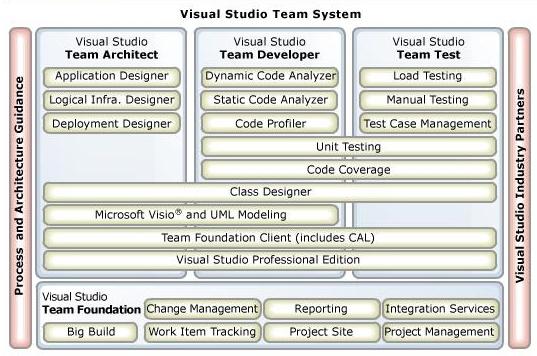
Visual Studio Team System
Well, we're not off to a good start. Here is the modern take on the software development lifecycle (SDLC) according to MS:
- Envisioning (output: scope document)
- Planning (approved plan)
- Development (tested code)
- Stabilizing (approved for release)
- Deploying (productive users)
The output from "deploying" is mine. The course merely says it marks the end of the cycle.
But the big worry for me is where is design? In a "normal" development team, the majority of developers are actually coders and anyway, the output from the development stage is "tested code"; no mention of architecture or design documentation. So design isn't part of the development stage. And we certainly can't expect it to come out of the planning stage.
VS2005 includes a "Team Architect" edition, so the activity hasn't been actually lost, but to exclude it from such a high level view, with no separate output, well, MS might as well come right out and formally declare it to be "deprecated".
Debug.Assert(this.WillNotHappenInProduction)
You couldn't wish for a simpler tool: just stuff a conditional test in your code to document what should be true at that point, and the debug build of your app will throw up a message if you (well, obviously not you; some other developer) got it wrong and didn't satisfy the precondition or screwed up some data somewhere.
But what should your code do if the assert is untrue in the release build? Well, you say, that shouldn't happen because your testing will have uncovered all the bugs that would lead to the assert failing. Hah!
In the best traditions of defensive programming, what you should really do is abort at least that operation by throwing an exception. But if you're going to do that, why bother with the assert in the first place?
The only justification I can think of that isn't pure "my code ain't got bugs" optimism (and if you're that kind of programmer you won't be bothering with asserts), is that you're sure that testing is going to exercise the dubious condition and you really can't afford the enormous time and space penalties of the if not condition then throw exception statement.
Don't get me wrong, I love Debug.Assert; it's a neat way of expressing pre- and post-conditions. But too often after writing one I get this nagging feeling that I haven't done enough to make my code "good". Perhaps what I need is a Release.Assert statement instead.
Monday, June 13, 2005
Upgrading to Whidbey Beta 2
Here is an ongoing list of issues encountered during a trial upgrade of our VB.NET app to Visual Studio.NET 2005 Beta 2. These are still very early days, so I expect more to come out of the woodwork, but at least our solution loads into this version—Beta 1 upgraded the projects and then complained that they were corrupt!
Use of Object as a switch statement selector
The programmer forgot to typecast an Object instance (retrieved from a database) before using it in a switch statement. This works in 2003 but not in 2005. You get the following error: "Error 133 Option Strict On disallows operands of type Object for operator '='. Use the 'Is' operator to test for object identity."
As it says, Option Strict must be on for this to show up (annoyingly the installation default is still Off). Example:
Dim colour As Object = Color.Red
Select Case colour 'Needs to be CType'd otherwise...
Case Color.Red 'Error here,
Case Color.White 'here,
Case Color.Blue 'and here.
End Select
End Sub
Inconsistent DLL References
Some of the projects in our solution referred to one particular DLL (FarPoint Spread) in the GAC while other projects referred to it in the programs folder (the same assembly version was begin referred to in all cases). At least this was the situation after the solution was upgraded. Whidbey complained about this when VS2003 never had.
Invalid Type Casts
In a couple of places in the code the developer had coded a DirectCast that was never going to work. This must have been in dead code because we never discovered it in testing (or production). VB 2005 has better compile-time type checking and picked up on these errors.
Decrypting a 0-Length Buffer
CryptoStream.Close threw if it was asked to decrypt a 0-length stream. This just worked in VS2003.
SqlCommand.Parameters.Add(String, Object) Obsoleted
This overload has been obsoleted because it can lead to ambiguous calls. AddWithValue should be used instead. I found more info here.
ArrayList.IndexOf Behaviour Change
In VS2003, a call to ArrayList.IndexOf(x) would call x.Equals(item) for each item in the list. In Whidbey, it calls item.Equals(x) for each item instead. This broke our app because we hadn't observed the Object.Equals override requirement that x.Equals(y) returns the same value as y.Equals(x). I have raised this as a compatibility bug at the MSDN Product Feedback Centre. (Update: the new behaviour will remain.)
Accessing Controls from the Wrong Thread
I knew that you should only access a control from the thread that created it, but we've been getting away with setting label text directly from a worker thread (until now).
P.S. Thanks to JFo for more info on this, i.e. you can set Control.CheckForIllegalCrossThreadCalls to False to bypass this check (if you're feeling naughty).
A Googol Warning Messages
Well, perhaps not quite that many, but there sure are a lot. I'm just beginning to sort through them.